Desktop notification that takes you to the tmux pane that notified
After a bit of searching I didn’t find any obvious solution to the problem of: I want a process running in a tmux pane to send a desktop notification, and when I click that notification I’m taken directly to the source pane.
Here are a couple scripts that will achieve it (courtesy of opencode and the new codex-5.3 model).
It’s tailored to my setup:
- macos
- Kitty terminal emulator
- tmux running locally
Example invocation:
./tmux-notify-return.sh <title> <message>
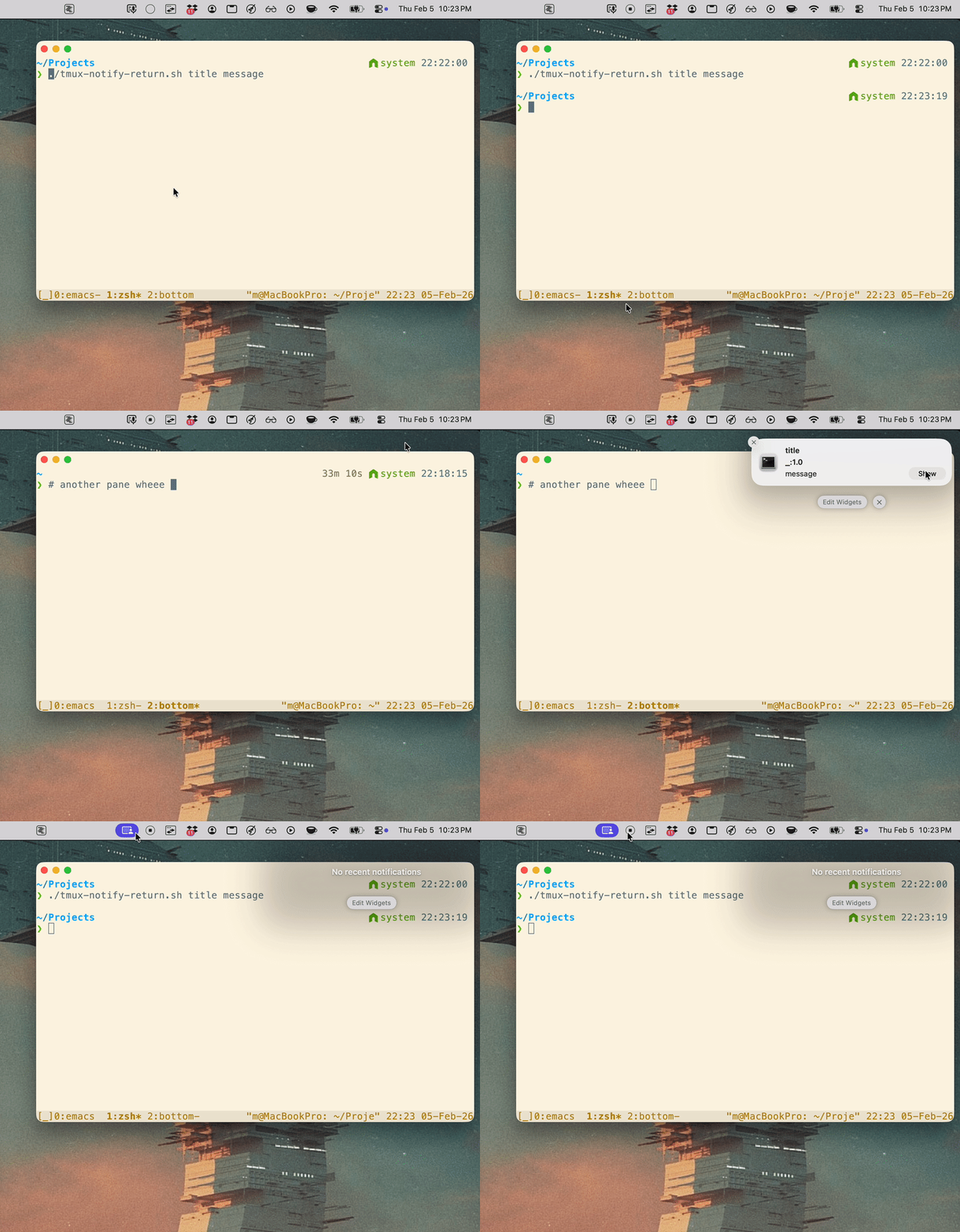
It’s probably a little brittle, but I think it will address a pain point I’ve been facing with a flurry of agents running across different tmux windows and panes.
Here are the scripts:
tmux-return.sh
What it does: click-handler script run by Notification Center; activates Kitty, switches the correct tmux client/window/pane, and retries briefly to avoid focus races.
#!/usr/bin/env bash
set -euo pipefail

if [[ $# -lt 4 || $# -gt 5 ]]; then
  echo "Usage: $0 <client_tty> <socket_path> <target_win> <target_pane> [target_pane_id]" >&2
  exit 2
fi

client_tty="$1"
socket_path="$2"
target_win="$3"
target_pane="$4"
target_pane_id="${5:-}"

TMUX_BIN="/opt/homebrew/bin/tmux"
OSA_BIN="/usr/bin/osascript"

"$OSA_BIN" -e 'tell application id "net.kovidgoyal.kitty" to activate'

for _ in 1 2 3 4 5 6 7 8 9 10; do
  "$TMUX_BIN" -S "$socket_path" switch-client -c "$client_tty" -t "$target_win" || true
  "$TMUX_BIN" -S "$socket_path" select-window -t "$target_win" || true

  if [[ -n "$target_pane_id" ]]; then
    "$TMUX_BIN" -S "$socket_path" select-pane -t "$target_pane_id" || true
  else
    "$TMUX_BIN" -S "$socket_path" select-pane -t "$target_pane" || true
  fi

  if [[ -n "$target_pane_id" ]]; then
    current_pane="$("$TMUX_BIN" -S "$socket_path" display-message -p -c "$client_tty" '#{pane_id}' 2>/dev/null || true)"
    [[ "$current_pane" == "$target_pane_id" ]] && exit 0
  else
    current_pane="$("$TMUX_BIN" -S "$socket_path" display-message -p -c "$client_tty" '#{session_name}:#{window_index}.#{pane_index}' 2>/dev/null || true)"
    [[ "$current_pane" == "$target_pane" ]] && exit 0
  fi

  sleep 0.1
done

exit 1
tmux-notify-return.sh
What it does: captures the tmux pane running this command (TMUX_PANE), then sends a clickable notification whose click runs tmux-return.sh back to that captured pane.
#!/usr/bin/env bash
set -euo pipefail

# Send a clickable macOS notification that returns you to the tmux pane
# where this command was run.
TMUX_BIN="/opt/homebrew/bin/tmux"
NOTIFIER_BIN="/opt/homebrew/bin/terminal-notifier"
RETURN_SCRIPT="/path/to/tmux-return.sh"

if [[ "${1:-}" == "-h" || "${1:-}" == "--help" ]]; then
  echo "Usage: $0 [title] [message]"
  echo "  title   Notification title (default: Return to tmux pane)"
  echo "  message Notification body  (default: Click to jump back in Kitty)"
  exit 0
fi

title="${1:-Return to tmux pane}"
message="${2:-Click to jump back in Kitty}"

if [[ ! -x "$TMUX_BIN" ]]; then
  echo "tmux not found at $TMUX_BIN" >&2
  exit 1
fi

if [[ ! -x "$NOTIFIER_BIN" ]]; then
  echo "terminal-notifier not found at $NOTIFIER_BIN" >&2
  exit 1
fi

if [[ ! -x "$RETURN_SCRIPT" ]]; then
  echo "return script not executable: $RETURN_SCRIPT" >&2
  exit 1
fi

# Capture the pane that is actually running this process when possible.
# In tmux shells, TMUX_PANE is stable even if the user navigates away later.
source_pane="${TMUX_PANE:-}"

if [[ -n "$source_pane" ]]; then
  target_win="$("$TMUX_BIN" display-message -p -t "$source_pane" '#S:#I')"
  target_pane="$("$TMUX_BIN" display-message -p -t "$source_pane" '#S:#I.#P')"
  target_pane_id="$("$TMUX_BIN" display-message -p -t "$source_pane" '#{pane_id}')"
else
  target_win="$("$TMUX_BIN" display-message -p '#S:#I')"
  target_pane="$("$TMUX_BIN" display-message -p '#S:#I.#P')"
  target_pane_id="$("$TMUX_BIN" display-message -p '#{pane_id}')"
fi

client_tty="$("$TMUX_BIN" display-message -p '#{client_tty}')"
socket_path="$("$TMUX_BIN" display-message -p '#{socket_path}')"

if [[ -z "$client_tty" || -z "$socket_path" || -z "$target_win" || -z "$target_pane" || -z "$target_pane_id" ]]; then
  echo "failed to capture tmux target metadata" >&2
  exit 1
fi

printf -v q_client '%q' "$client_tty"
printf -v q_socket '%q' "$socket_path"
printf -v q_win '%q' "$target_win"
printf -v q_pane '%q' "$target_pane"
printf -v q_pane_id '%q' "$target_pane_id"

exec_cmd="$RETURN_SCRIPT $q_client $q_socket $q_win $q_pane $q_pane_id"

"$NOTIFIER_BIN" \
  -title "$title" \
  -subtitle "$target_pane" \
  -message "$message" \
  -execute "$exec_cmd"